Launch price ₱499, one-time. No monthly fee.
⚡ Auto-posting, on autopilot

Drop your videos. They post themselves.

24/7 Bots listen to each video, write the caption and pick the time. Then your Claude schedules every video on TikTok, Facebook, Instagram or YouTube, and each one goes live at its time. You only press two buttons.

Get 24/7 Bots — ₱499See the bots at work
  • One payment. Nothing monthly.
  • No coding
  • Your passwords stay in your own browser
∞search keywords in every caption. You choose how many.
100videos a day, at most
4places to post: TikTok, Facebook, Instagram, YouTube
1payment. No monthly fee.
Sound familiar?

Six things that slow every creator down

Each one is fixed by a bot. Scroll to watch it happen.

Handled by SEO Caption Bot

Typing a caption and posting by hand, for every single video.

24/7 Bots do it for you. They listen to each video in Chrome and write keyword phrases people really search (10 by default, you choose how many). No script to paste, no hashtags, no extra software to install. English by default.

By hand
Video 1 of 20
🎬
Post
Typing…
SEO Caption BotI listen to every video and do the captions for you.
24/7 Bots
• •
20 videos
Ready
🎧 Listen
Handled by SEO Caption Bot

Hard to get found? And it never sounds like you?

Search-ready, then trained to your liking. It writes the keyword phrases people actually search, aiming for the best possible search match. Don't like my copywriting? Train me on your style instead. Set "My rules" (how many keywords, hashtags or not, which language), or use "Train SEO Bot": paste old captions or drop a PDF, DOCX or TXT. It saves on your computer and writes the way you like.

• •
SEO Caption BotDon't like my writing and have your own style? Tell me your style. I will write like you.
Before
🔍
Other video
Other video
Your video …
Your caption
Default: search keywordsYour style
Handled by Scheduler Bot

You never know when to post. Or you forget.

You pick the days and times. Choose every day, weekdays, Mon-Wed-Fri or your own days, and the bot spreads your videos across them. Want full control? Give each video its own date and time, and move videos up or down. Up to 20 a day when you pick the times, up to 100 a day with Auto-space. Time zone: Asia/Manila.

^ ^
Scheduler BotTell me the days. I will pick the times.
Before
What time again? 😵
Every dayWeekdaysMon-Wed-Fri
Handled by Posting Bot

Scheduling one video at a time is slow and boring.

Pick where to post. Then it posts on autopilot. Tick TikTok, Facebook, Instagram or YouTube. Your Claude in Chrome schedules each video, one by one, and each platform posts it at the time you picked.

◦ ◦
Posting BotHand it to me. I will schedule each one.
Before
TikTok ✓Facebook ✓Instagram ✓YouTube ✓
Handled by Bot Manager

What if something gets missed or goes wrong?

It checks its own work. A Manager checks everything before it starts. It warns you about a time in the past, two videos at the same time, or posts too close together. Claude stops if anything looks wrong, then checks your posts afterwards to confirm each video.

˘ ˘
Bot ManagerI check everything before we start.
Without checks
🧭 Manager checking…
Handled by Bot Manager

Tools that ask for your password make you nervous.

Yours stays with you. Your passwords stay in your own browser and never go through the tool. Your Groq key and your captions are saved on your own computer.

˘ ˘
Bot ManagerNothing asks for your password. Ever.
Other tools
Tool asks:Enter your password
→
Their server🚨 Sent
🔒Stays in your own ChromeNever goes through the tool
Meet the team

Your 24/7 Bots have an office

Your scheduled posts go out day and night, and the bots behind them have a place to work. Flip on Office view and watch the team: each bot sits at its own desk, a small hologram shows what it is working on, and between jobs they grab a coffee, play arcade or hang out on the sofas.

Office view in the tool. The bots grab coffee and hang out in the lounge. Then you press Run everything (button added for the video), every bot gets its job, sits at its desk and a hologram shows what it is working on. It is a second way to watch the same bots work. One click takes you back to the canvas.
How it works

Set up once. Then three steps.

1

Drop your videos

As many as you want, all at once.

video-01video-02video-03
2

Press "Run everything"

Captions are written, times are picked, and everything is checked.

Captions ✓Times ✓Checked ✓
3

Press "Hand to Claude"

Paste the prompt into Claude in Chrome. It schedules each video, one by one.

Scheduled ✓Scheduled ✓Scheduled ✓

Tip: save the prompt as a shortcut in Claude in Chrome. Next time, it is one click.

Proof

A real month of reels, lined up

Drop the videos, press the two buttons, and the whole schedule is lined up on the days you choose.
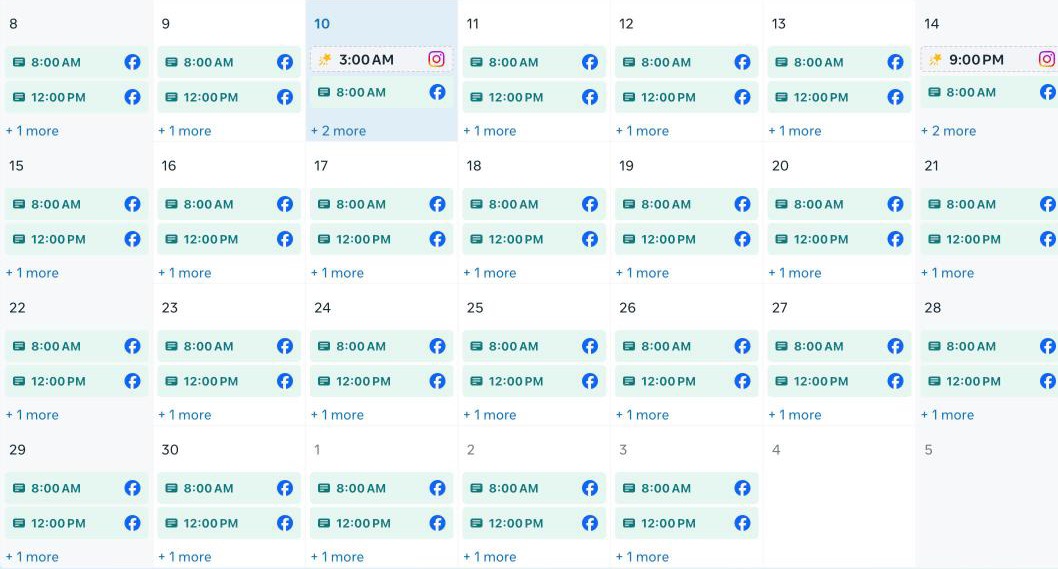
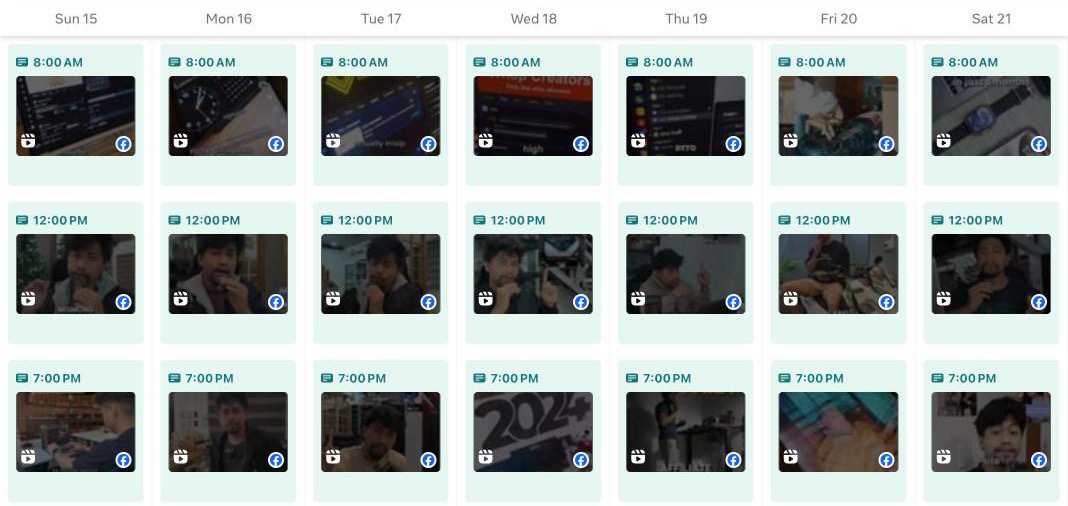
A real month view of a Facebook page's content calendar: reels scheduled every day from November 8 to December 3.Zoom on one week of the same page: three reels a day, at 8 AM, 12 PM and 7 PM, from Sunday 15 to Saturday 21.
Real screenshots of one Facebook page: four weeks of reels lined up, three a day (two show per day, the third is behind “+1 more”), and a zoom on one week at 8 AM, 12 PM and 7 PM.
Free bonus: the 24/7 AI Editor

6 videos we made with Claude

472K views

The 24/7 AI Editor is free with 24/7 Bots. It helps with the editing: cuts, captions, graphics and sound effects, run with Claude. Your bots handle the captions and the posting.

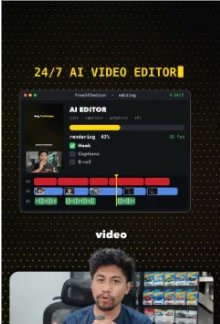
Our top 3 of the 6: 172.5K, 170.1K and 72.6K views. These are real views.

Get 24/7 Bots — ₱499
Read this before you buy

What you need

Google Chrome only for scheduling. Claude in Chrome does not work on Safari, Firefox, Edge or other Chromium browsers. You also need a paid Claude plan (Pro, Max, Team or Enterprise). There is no free tier.
  • Google Chrome and the Claude in Chrome extension (claude.ai/chrome), signed in
  • A paid Claude plan: Pro, Max, Team or Enterprise
  • A laptop or desktop computer (Mac or Windows). This runs on a computer, not on a phone
  • Your accounts on the places you post (TikTok, Facebook, Instagram, YouTube), logged in on your Chrome. TikTok needs a Creator or Business account.
  • A free Groq account and your own API key. We show you how after you buy.
  • Python 3 (Macs often already have it)
  • The videos you want to post
  • No coding

Is this for you?

Yes, if

  • You post often and want to automate it: affiliate creators, personal brands, businesses, and editors who post for clients
  • You already have a Claude plan, or you are ready to get one
  • You are tired of writing captions and scheduling by hand

Not yet, if

  • You don't use Chrome, or you don't want a paid Claude plan
  • You want a guarantee of views

What's true, what's not yet

  • ✅ Works (tested on Jaycee's accounts): the caption bot, listening to the video, the schedule screen, and Claude in Chrome scheduling.
  • ⏳ TikTok, Facebook, Instagram and YouTube have all been tested, and Facebook has run a full month of reels, three a day. We have not tested very large videos (100 MB and up) or several platforms in one run.
  • ✅ Tested on a Mac and on Windows, both with Chrome. Not tested: Safari and Firefox.
  • We don't use the platforms' APIs. Claude in Chrome does the clicking in your own browser, and your logins stay there.
  • TikTok posts must be Everyone or Friends. TikTok can't schedule "Only you".
  • The scheduling runs at a human pace, like a real person doing it by hand, one video at a time. It is not rushing the platforms, and you are not the one doing it.

One price. Pay once.

No monthly fee. Yours to keep.

Launch price, first week only
₱499 ₱999

The first week is the launch price. After that it is ₱999.

  • SEO Caption Bot: captions from what you say in the video
  • Train SEO Bot: it writes in your style
  • Scheduler Bot: your days, your times, a date and time for every video
  • Bot Manager: checks before anything is scheduled
  • Posting Bot: TikTok, Facebook, Instagram and YouTube
  • Office view, and a step-by-step setup guide
  • Free bonus: the 24/7 AI Editor
Get 24/7 Bots — ₱499

Digital product policy. Due to the digital nature of this product, purchases are generally final and non-refundable once access has been provided, except where required by applicable law.

Needs Google Chrome, Claude in Chrome with a paid Claude plan, and a free Groq key. The Claude plan is paid to Claude, not to us.

1Pay at the secure checkout
2You land on the setup page right away
3Download the tool and follow the steps

FAQ

What do I need?

No coding. You need Google Chrome (only Chrome works for the posting step), Claude in Chrome with a paid Claude plan (Pro, Max, Team or Enterprise, no free tier), and a free Groq key.

Is it safe for my accounts?

The tool never asks for your passwords, and they never go through us. You stay logged in on your own Chrome. But these platforms may not like browser automation, so the risk is yours. Use it on your own accounts.

Is it really auto-posting?

Yes, in practice. Your Claude in Chrome schedules each video, and the platform posts it by itself at the time you picked. It schedules at a human pace, like a real person doing it by hand, and you are not the one clicking.

Where can I post, and how much?

TikTok, Facebook, Instagram and YouTube. You tick where you post. Each one was tested with short clips, so start small. Up to 20 posts a day when you pick the times, up to 100 a day with Auto-space. How far ahead you can schedule depends on the platform.

Can I set my own date and time for each video?

Yes. Give every video its own date and time, or let the bot spread them over the days you pick.

How do I pay, and how do I get it?

Pay once and you are taken straight to the setup page. There you download the tool and follow the steps: add your Groq key, choose where you post, and do your first run. We also email you the setup link right after you pay, so you can open it again anytime.

Why is the price going up?

₱499 is the launch price for the first week. After that it is ₱999, so buying early saves you ₱500.

• •
SEO Caption Bot
^ ^
Scheduler Bot
˘ ˘
Bot Manager
◦ ◦
Posting Bot

Just drop your videos. It handles the rest.

Captions and scheduling on one canvas. One-time payment, nothing monthly. Needs Chrome and a paid Claude plan.

Get 24/7 Bots — ₱499

Digital product policy. Due to the digital nature of this product, purchases are generally final and non-refundable once access has been provided, except where required by applicable law.